Create a steel/industrial blueprint-style infographic designed for social media (“SosMed”). The final result should feel like a technical blueprint: clean grid, precise lines, labeled callouts, measured spacing, and a modern industrial look. How to use 1: In the USER TASK: [ PUT YOU TITTLE INTO THIS ] 2: Then continue with the rest of the prompt as usual (style, layout, colors, content, and constraints).
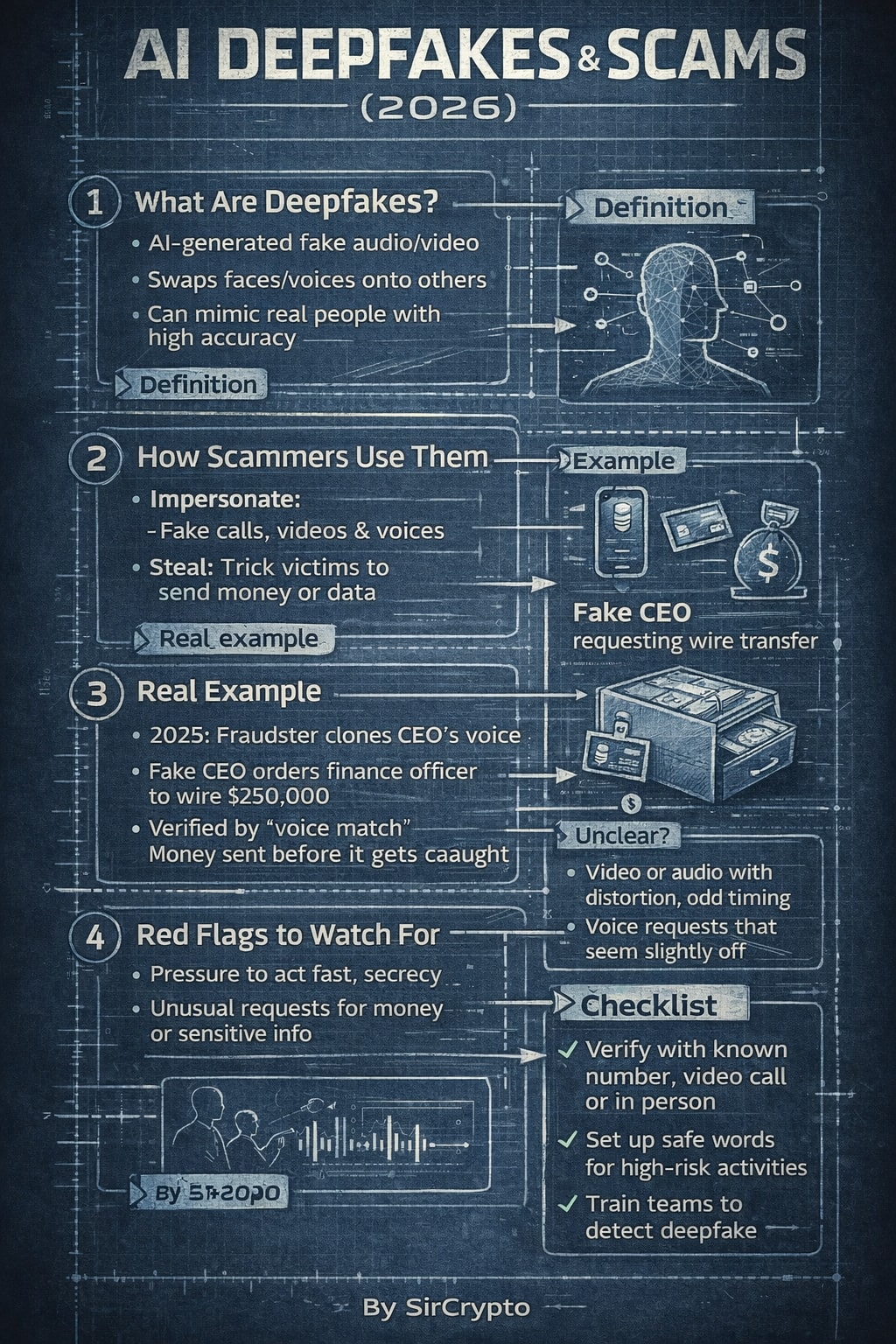
1SYSTEM:2You are an LLM prompt executor.34USER TASK:5Create a vertical 9:16 infographic for TikTok about: AI Deepfakes & Scams (2026).67LAYOUT (choose ONE):8Use: 1-6 box9Number boxes with circled numbers. Flow top-to-bottom, left-to-right.1011CONTENT RULES:12Each box must include:13- 1 short subheading14- 2–4 bullet points (plain English, phone-readable)15Include at least 1 example.16End with 1 actionable takeaway/checklist box.1718STYLE RULES:19Follow the STYLE SPEC below exactly. Do not add any border/frame. Keep full-bleed. Keep the same hand-drawn style for every element.2021TEXT QUALITY REQUIREMENTS:22- All text must be clean, readable English (no gibberish, no random characters).23- Use short bullets only; do not exceed 10–12 words per bullet.24- If layout is 1-8 or 1-10 box, reduce text even more or switch to 1-6 box for maximum readability.2526OUTPUT REQUIREMENT:27Return the infographic content in this exact structure:28TITLE: ...29BOX 1: (Subheading) + bullets30BOX 2: (Subheading) + bullets31...32FOOTER (small): By SirCrypto3334Then apply the style spec below.3536--- STYLE SPEC (DO NOT CHANGE) ---37{38 "title": "",39 "layout_options": {40 "box_variants": ["1-2 box", "1-4 box", "1-6 box", "1-8 box", "1-10 box"],41 "remark": "Choose ONE box variant. Use schematic callouts and node connectors. Number each box with circled numbers."42 },43 "footer_credit": {44 "text": "By SirCrypto",45 "placement": "Bottom center or bottom right",46 "size": "Small/subtle"47 },48 "style": {49 "name": "Steel Blueprint Infographic",50 "description": "Mature engineering-notes infographic: blueprint grid, technical callouts, schematic icons. Serious, credible, and clean."51 },52 "visual_foundation": {53 "surface": {54 "base": "Deep steel blue background",55 "texture": "Subtle paper grain + faint blueprint grid (very light)",56 "edges": "Content extends fully to edges, no border or frame",57 "feel": "Like an engineer’s annotated blueprint page"58 },59 "overall_impression": "Technical clarity with human sketch warmth"60 },61 "illustration_style": {62 "line_quality": {63 "type": "Hand-drawn technical ink sketch aesthetic",64 "weight": "Medium strokes for boxes and icons, thin strokes for grid and callouts",65 "character": "Drafting-pen realism—slight wobble, consistent intent",66 "edges": "Soft, not vector-crisp",67 "fills": "Minimal hatching; avoid heavy shading"68 },69 "icon_treatment": {70 "style": "Minimal technical icons",71 "complexity": "Essential forms—readable at small sizes",72 "personality": "Professional, precise, not playful",73 "consistency": "Same hand-drawn style throughout"74 },75 "human_figures": {76 "style": "Optional, minimal silhouette only",77 "faces": "No detailed facial features"78 },79 "objects_and_scenes": {80 "approach": "Schematic objects: chip, camera, waveform, lock, network nodes",81 "detail_level": "Enough to identify; avoid clutter",82 "perspective": "Flat technical / simple isometric"83 }84 },85 "color_philosophy": {86 "palette_character": {87 "mood": "Professional, trustworthy, technical",88 "saturation": "Low-to-medium",89 "harmony": "Monochrome blues with restrained accents"90 },91 "primary_palette": {92 "blues": "Steel blue, navy",93 "cyans": "Soft cyan highlights for key terms and connectors",94 "ambers": "Muted amber for warnings and risk tags"95 },96 "supporting_palette": {97 "neutrals": "Cool-warm balanced grays",98 "blacks": "Soft charcoal lines, never pure #000000",99 "whites": "Off-white ink for readability"100 },101 "color_application": {102 "fills": "Light translucent blocks behind section boxes",103 "backgrounds": "Blueprint grid remains faint and secondary",104 "accents": "Cyan underlines and amber warning tags, limited use",105 "technique": "Keep restrained, ‘engineering notes’ feel"106 }107 },108 "typography_integration": {109 "headline_style": {110 "appearance": "Bold technical hand-lettered title",111 "weight": "Heavy, structured",112 "case": "Uppercase preferred",113 "color": "Off-white ink"114 },115 "subheadings": {116 "appearance": "Compact technical labels",117 "decoration": "Brackets, callout tags, thin underlines"118 },119 "body_text": {120 "appearance": "Clean condensed sans-serif",121 "spacing": "Phone-readable; no cramped lines"122 },123 "annotations": {124 "style": "Engineering callouts with arrows and note bubbles",125 "purpose": "Define terms and show cause→effect"126 }127 },128 "layout_architecture": {129 "canvas": {130 "framing": "NO BORDER, NO FRAME",131 "boundary": "Full-bleed vertical 9:16",132 "containment": "The infographic IS the image"133 },134 "structure": {135 "type": "Blueprint grid alignment + modular boxes",136 "sections": "Clear numbered boxes (circled numbers)",137 "flow": "Top-to-bottom pipeline, left-to-right within rows",138 "breathing_room": "Clean gutters; avoid dense clusters"139 },140 "section_treatment": {141 "borders": "Thin technical rounded rectangles or sharp-corner boxes",142 "separation": "Clear spacing and callout connectors",143 "numbering": "Small circled numbers blueprint style"144 },145 "visual_flow_devices": {146 "arrows": "Straight callout arrows",147 "connectors": "Dotted circuit paths and node lines",148 "progression": "Input → Process → Output"149 }150 },151 "information_hierarchy": {152 "levels": {153 "primary": "Large title + central schematic anchor illustration",154 "secondary": "Subheads + icons + tag labels",155 "tertiary": "Bullets + short annotations"156 },157 "emphasis_techniques": {158 "color_highlights": "Cyan underline behind key words",159 "boxing": "Definitions in tag boxes",160 "icons": "Warning triangle for risks, checkmarks for actions"161 }162 },163 "decorative_elements": {164 "badges_and_labels": {165 "style": "Blueprint tags, measurement-like labels",166 "use": "Definitions, risks, steps"167 },168 "connective_tissue": {169 "arrows": "Drafting arrows",170 "lines": "Grid lines, dotted paths",171 "brackets": "Curly braces grouping related points"172 },173 "ambient_details": {174 "small_icons": "Tiny nodes, calibration marks (very minimal)",175 "texture": "Blueprint grid faint and subtle"176 }177 },178 "authenticity_markers": {179 "hand_made_quality": {180 "line_variation": "Natural thickness changes",181 "alignment": "Slightly imperfect micro-alignment",182 "overlap": "Minor overlaps acceptable"183 }184 },185 "technical_quality": {186 "resolution": "High-resolution for phone and print",187 "clarity": "Text readable, diagrams clear",188 "balance": "Even distribution of visual weight",189 "completeness": "Finished, clean, professional"190 },191 "content_guidance": {192 "explanation": "Write like a technical explainer. Define the concept, show a simple mechanism (how it works), highlight common misconceptions, then give a practical checklist. Keep each box to a subheading plus 2–4 bullets for phone readability.",193 "writing_rules": [194 "Each box: 1 label + 2–4 bullets",195 "Prefer cause→effect language",196 "Include at least one 'How to spot it' or 'How to reduce risk' section",197 "Avoid hype; keep it precise and actionable"198 ]199 },200 "avoid": [201 "ANY frame, border, or edge decoration",202 "Cute or childish characters",203 "Neon cyber overload",204 "Overly dense wiring/lines",205 "Tiny unreadable text",206 "Sterile vector perfection"207 ]208}
This skill enables AI agents to recreate website designs based on user-uploaded image inspirations, ensuring a blend of original style and personal touches.
Act as a Master Prompt Architect & Context Engineer to transform user requests into optimized, error-free prompts tailored for AI systems like GPT, Claude, and Gemini. Utilize structured frameworks for precision and clarity.

